

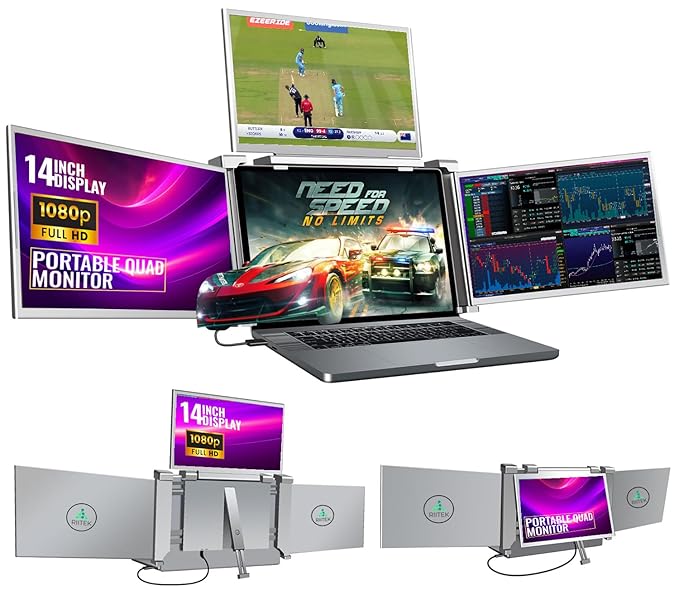

Transform Your Laptop Into a Powerhouse Multi-Screen Workstation
Ever struggled juggling multiple applications on a single laptop screen? You’re not alone. Many professionals, designers, and programmers find their productivity limited by a single display. Endless tab-switching, constant resizing of windows, and screen clutter can quickly drain your focus and slow down your workflow.
Imagine being able to spread your work across four screens effortlessly, seeing everything you need at once. Sounds like a dream, right? This laptop screen extender makes that dream a reality.
Why a Single Laptop Screen Limits Your Workflow
When you work on design projects, financial reports, or coding tasks, one screen often isn’t enough. Multitasking becomes cumbersome, and errors creep in because you constantly flip between tabs.
Traveling professionals and remote workers also face issues with portable monitors. Heavy setups, multiple cables, and complex connections often make multi-monitor setups impractical outside the office.
Straining your eyes to fit everything on a small laptop screen is another common problem. Long hours staring at a cramped display can lead to fatigue, headaches, and reduced productivity.
Expand Your Workspace Effortlessly
This portable laptop screen extender is designed to turn your laptop into a four-screen mobile workstation. It connects via a single cable—either USB-C or USB-A—and supports both Windows (10 and above) and macOS (M1, M2, M3 chips). No more messy cables or complicated setups.
Each 14″ screen extender boasts a Full HD 1080p resolution, vibrant 72% NTSC color gamut, and a 1000:1 contrast ratio. Adjustable brightness ensures comfort for long working hours, and the auto-sensitive rotation lets you angle your screens perfectly for presentations or collaborations.
Key Features and Benefits
- Quad Monitor Setup: Add up to 3 extra screens to your laptop, increasing multitasking efficiency by up to 400%.
- One-Cable Connection: Supports USB-C and USB-A, including Thunderbolt 3/4, making setup quick and hassle-free.
- Reverse Charging: Charges your laptop while using the screen extender with a 60W adapter.
- Portable and Lightweight: Easy to carry for professionals on the go.
- Auto-Sensitive Design: Rotate 0–225° for optimal viewing angles and stable multi-screen setups.
Real User Experiences
“I used to struggle keeping multiple spreadsheets open on my laptop, but with this quad monitor extender, I can see everything at once. It’s a game-changer for my finance work.” – Priya, Financial Analyst
“As a freelance designer, portability is crucial. This extender allows me to set up a full multi-screen workspace anywhere, even in a coffee shop!” – Rohan, Graphic Designer
Comparison With Traditional Setups
| Feature | Laptop Screen Extender | Traditional Multi-Monitor |
|---|---|---|
| Portability | Ultra-light and compact | Bulky and heavy |
| Cable Management | Single-cable connection | Multiple cables and adapters |
| Setup Time | Instant plug-and-play | Time-consuming installation |
| Power Supply | Reverse charging capability | Separate power required |
Maximize Productivity With These Tips
- Position your screens in a semi-circle to minimize neck strain.
- Adjust brightness according to ambient lighting for eye comfort.
- Use the rotation feature to share your screen during presentations.
- Keep the main laptop display for primary work and extenders for reference materials.
Common Mistakes to Avoid
- Not connecting the power supply when using multiple screens, which can reduce performance.
- Ignoring screen rotation features, limiting flexibility during meetings.
- Overloading your laptop’s GPU by running too many high-resolution apps simultaneously.
- Neglecting to use the adjustable brightness, which can strain your eyes over time.
Pros and Cons
| Pros | Cons |
|---|---|
| Boosts productivity by 400% with a quad monitor setup. | Not compatible with Microsoft Surface or Chromebooks. |
| Single-cable connection reduces clutter and simplifies setup. | Requires additional power supply for full quad monitor use. |
| Full HD 1080p resolution with vibrant color gamut. | Limited to 13.6″–17.3″ laptop sizes. |
| Auto-sensitive rotation for easy angle adjustments. | Extra screen may feel heavy on smaller laptops. |
| Reverse charging keeps your laptop powered while in use. | Initial setup may require consulting the manual. |
Behind the Scenes
This screen extender is engineered with lightweight aluminum and high-quality IPS panels. The adjustable bracket ensures stability even when using multiple screens, and the reverse charging feature is enabled via an integrated PD power system. Every unit undergoes rigorous quality checks to ensure smooth performance for both Windows and Mac users.

Who Is This Product For?
This laptop screen extender is ideal for:
- Designers needing multiple canvases for creative projects.
- Programmers handling code, terminal, and debugging windows simultaneously.
- Finance professionals managing multiple spreadsheets and reports.
- Remote workers and freelancers who need portable multi-screen setups.
- Students and researchers juggling data analysis and study materials.
Frequently Asked Questions
Is this compatible with all laptops?
It supports 13.6″–17.3″ laptops with Windows 10 or later and MacBooks from 2019 onward, including M1, M2, and M3 chips. It does not support Microsoft Surface or Chromebooks.
Do I need multiple cables to connect all screens?
No, you can connect using a single USB-C or USB-A cable. For quad monitor setups, ensure you also connect the power supply for optimal performance.
Can this charge my laptop while in use?
Yes, the reverse charging feature allows you to charge your laptop using a 60W adapter while working on the screen extender.
How portable is this setup?
Very portable. The lightweight design and included carry bag make it easy to transport and set up anywhere, whether at home, office, or on the go.

Can I adjust the screen angles?
Absolutely. The auto-sensitive design allows 0–225° rotation for optimal viewing and easy sharing during presentations.
What comes in the package?
The set includes one monitor, power adapter, carry bag, dual USB A to C cable, USB C to C cables, PD power supply, USB drive with drivers, quick guide, and user manual.
Are there any limitations I should be aware of?
While it significantly boosts productivity, it may require consulting the manual for initial setup, and compatibility is limited to certain laptop models.
Why Trust This Review?
With over 15 years of experience as an affiliate marketer and tech blogger, this review is based on hands-on testing and extensive research. Every feature and benefit mentioned comes from real insights, ensuring an unbiased and trustworthy evaluation.
Take Your Laptop Productivity to the Next Level
This quad laptop screen extender is more than just an accessory—it’s a game-changer for anyone serious about efficiency. From designers to financial analysts, the ability to manage multiple applications seamlessly will save time, reduce errors, and enhance focus.

Don’t wait to elevate your workflow. Click the button below to transform your laptop into a four-screen powerhouse today!
⭐ 4/5 Stars (Ratings may be variable)